iVision
Microscopy on a Mac!
iVision‐Mac is the world's most powerful microscopy imaging software available for Apple computers. iVision-Mac includes image acquisition, processing, measurement, and analysis software. iVision‐Mac directly supports the acquisition of images and time-lapse series through automated and scriptable control of optical hardware.
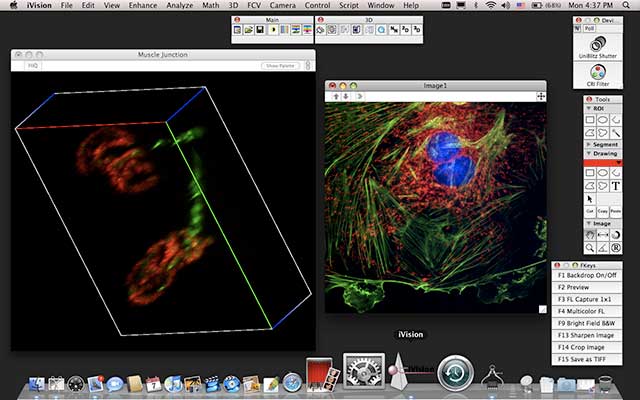
Complete Imaging Package
iVision‐Mac is image acquisition, processing, measurement, and analysis software. iVision‐Mac directly supports the acquisition of images and time-lapse series. Sophisticated imaging processes or even simple routines can be automated down to the push of a single button through the use of the intuitive scripting tool. There is no need to learn Visual Basic or other programming languages when you want to automate your imaging routines. Also, fully integrated extensions easily automate microscope control by driving motorized microscope hardware. Our team of scientists and engineers designed iVision‐Mac to include the full set of tools needed to build imaging, analysis, and automated solutions for the laboratory. Free camera controls let you acquire images from any camera we support. Extensions (such as Deconvolution and Motion Control) smoothly integrate new processing, analysis, and hardware control commands into iVision‐Mac. iVision‐Mac is a proven solution worldwide, and can be found in hundreds of citations in the most prestigious journals every year. Since its creation, thousands of scientists have incorporated iVision‐Mac into their research.
Image Processing
iVision‐Mac includes a full suite of image processing features and tools. Not only do these tools allow you to enhance image quality when necessary, but they also make it easy to analyze the image by separating objects or areas of interest from the background. With iVision‐Mac, you can easily combine multiple image sequences and readily blend grayscale (e.g. DIC) images with fluorescence image sequences. iVision‐Mac also gives you the ability to process and visualize 3D images with the included 3D extension. The 3D visualization tool renders sequences of images in the X or Y plane, or in a tumble mode. You can pseudocolor the rendered image for enhanced image visualization.
Analysis
Using spatially calibrated images with the automated measurement tools, scientists can quickly and easily perform dozens of image processing tasks. The resulting data can be saved in iVision‐Mac, or opened in a spreadsheet program such as Microsoft® Excel® for further analysis. User definable plots and histograms are also included to present the data as desired. iVision‐Mac also includes densitometry measurements that can be used to plot an analysis such as mean intensity over time. iVision‐Mac supports the measurement of individual objects, regions of interest, and entire images. iVision‐Mac performs batch analysis of images and sequences using file lists and indexed files.
Automation
Using iVision‐Mac's highly integrated user interface, you can move seamlessly between controlling hardware, acquiring images, and processing and analyzing data. With the appropriate automated hardware and extensions, iVision‐Mac fully automates many imaging routines. This includes the acquisition of time-lapse images, Z-stacks, and multi-dimensional images.
iVision‐Mac is a trademark of BioVision Technologies, Inc, Exton, PA.
Tools
Main Tools
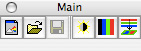
The Main Tools provide easy access to the most common image operations in Life Science imaging: creation of new images; opening and saving image files; normalization; pseudocoloring; and creation of new color images from multiple images representing data in multiple colors, representing fluorescent signals and brightfield background, or representing fluorescent labels that may be colocalized.
Image Tools
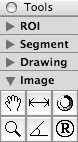
The Image Tools allow one to scroll across an image that does not fit within its window, to adjust the magnification of the pixels in the image window, to measure lengths or angles, to rotate the color tables on indexed color images, and to set registration marks used for image registration.
Function Key Palette
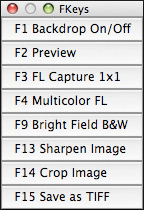
Operations not available on other toolbars can be bound to keyboard function keys and listed in the Function Key Palette, providing easy access to facilities used every day. iVision‐Mac binds function keys to individual functions that it provides or to scripts recorded within iVision‐Mac. This provides easy access to the operations that one uses frequently.
Here is an example of a typical function key palette. The function keys run scripts for display of the camera's view of the specimen, capture of images using fluorescence microscopy or brightfield microscopy, enhancement of the image, cropping unneeded data, and saving the results to disk.
Device Toolbar
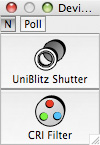
iVision‐Mac provides a point‐and‐click interface for control of imaging‐related hardware. The position of devices such as filter wheels, X-Y stages and Z-axis focus drives can be displayed and may be altered.
Region of Interest Tools

The Region of Interest tools allow the selection of the area within an image for processing, filtering or quantifying. The defined region of interest may be a rectangle, an oval, a polygon, a shape drawn freehand or a shape defined by the segments as defined by automated segmentation or by manual use of iVision‐Mac Segment Tools.
Segment Tools
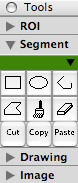
The Segment tools define areas to be measured. iVision‐Mac allows the creation of as many as nine segments in each image window, and can measure the segments individually.
These tools define segments as rectangles, ovals, polygons, lines, or areas defined with a paintbrush. A Cut tool allows the separation of objects that are clumped together, allowing iVision‐Mac to count the objects as individuals.
Drawing Tools
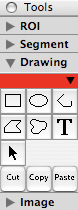
The drawing tools add annotations, highlighting, and outlines to an image. Drawings exist within the drawing overlay, which is a layer independent of the image data. Drawings do not affect the image data.
These tools define drawing objects as rectangles, ovals, polygons, lines, shapes drawn freehand, or text annotations. Each drawing on the drawing overlay is an individual object, and may be treated without affecting other drawing objects present.
3D Tools
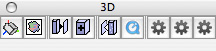
The 3D Tools provide easy access to common operations on sequences of two‐dimensional data sets that are loaded into image windows:
Viewing a multi‐frame stack as a volume in 3‐D space, rotating it in any direction by grabbing it with the mouse;
Viewing one of the frames of the stack as an image;
Constructing a single‐image in-focus view of a stack of frames that were acquired at different positions along the Z‐axis;
Synthesis of a two‐dimensional image of the data in the entire stack;
Creation of a sequence of 3‐D projections through the data set, representing views from positions at regular intervals around the stack’s X‐axis or its Y‐axis;
Creation of a QuickTime™ movie from the frames in an an image window;
No Neighbor Deconvolution (“single‐image deconvolution”) and Nearest Neighbor Deconvolution (“three‐image deconvolution”);
No Neighbor deconvolution that is based on a theoretical point spread function;
Deconvolution, each resulting frame using information from data set planes as dictated by a theoretical point spread function or one sampled from the microscope that acquired the original data.
QuickTime is a trademark of Apple, Inc., Cupertino, CA.
iVision‐Mac is a trademark of BioVision Technologies, Inc, Exton, PA.
System Requirements
iVision‐Mac 4.5 for Macintosh OS X
- Operating System: Mac OS X version 10.5, 10.6, 10.7; OS X 10.8, 10.9, 10.10;
- Any Power Mac;
- Supported camera with an IEEE 1394 (FireWire) interface, a Conventional PCI interface or a PCI Express (PCIe) interface;
- Any Intel-based Macintosh;
- iVision‐Mac 4.5 is a ‘Universal’ application: it runs native Intel code on Intel-based Macs;
- Devices must have Intel-native drivers;
- Supported camera with an IEEE 1394 (FireWire) interface or a PCI Express (PCIe) interface;
- At least 512 MB RAM, 1 GB recommended;
- A CD-ROM drive or Internet access, for installation;
- A hard disk or solid state drive for the application and data;
- A display card and monitor set to ‘Millions of Colors’ (24-bit or greater) is best.
PCI boards, PCI Express boards, Power Mac G5s and Mac Pros
The Mac Pro (Late 2013)
This Mac has no expansion slots built in. Any interface board must be plugged into an external card cage that attaches to one of the Mac’s Thunderbolt ports, and the manufacturer must provide drivers tested for use when connected via Thunderbolt.Apple sells a Thunderbolt to FireWire Adapter through which one can attach a FireWire-based (IEEE 1394) camera.
Contact BioVision regarding use of this computer for image acquisition.
Other models of Mac Pro
Mac Pros are equipped with ‘PCI Express’ expansion slots which are not compatible with ‘PCI’ interface boards. They include FireWire ports and can control FireWire-based (IEEE 1394) cameras and PCI Express interface cards;.Hamamatsu Photonics offers PCI Express interface cards.
Contact BioVision Technologies regarding use of a Mac Pro computer for image acquisition.
The Power Mac G5 (Late 2005)
This Mac is equipped with ‘PCI Express’ expansion slots which are not compatible with ‘PCI’ interface boards. It includes FireWire ports and can control FireWire-based (IEEE 1394) cameras.Hamamatsu Photonics offers PCI Express interface cards.
Contact BioVision Technologies regarding use of this computer for image acquisition.
Other models of Power Mac G5
These Macs require PCI cards that operate at 3.3 Volts. Most camera cards made prior to 2004 operate at 5 Volts and can not be plugged into a Power Mac G5. ‘Universal PCI’ cards that work with both 3.3 and 5 volt slots are available from the following manufacturers for use in these G5 Macs and older machines:- Diagnostic Instruments
- Hamamatsu Photonics
- Photometrics
Further information
For more information on specific Apple computers visit Apple's website.Contact us for help determining if your computer can run iVision-Mac
Software Features
Image Capture
| Camera Control | Capture images using popular scientific grade CCD cameras. |
| Time Lapse | Capture images at specified time intervals. Measure and plot intensities over time. |
| Control Microscopes | Control motorized microscope stands and confocal imagers from popular manufacturers. |
| Control Devices | Control third-party devices: shutters, filter wheels, stages, light sources. |
| Z-Stacks | Capture through-focus series using Z-axis focus drives. |
| Multi-Fluorescence | Capture images from multiple wavelengths, overlay colors, and quantify intensities. |
Image Processing
| Batch File Processing | Create a list of files to process all at once. Indexed files provide automatic file naming and numbering. |
| Split Color Channels | Split any 24- or 48-bit color image into the separate components. View the separated images in their corresponding colors. Operate on the color component images as you would any grayscale image. |
| Merge Color Channels | Build a 24- or 48-bit color image out of three separate image files or sequences. Blend a fluorescent image or sequence with a DIC or other grayscale image. |
| Image Arithmetic | Combine and compare two images on a pixel-by-pixel basis. Perform background subtraction and image averaging to reduce noise. Mask certain frequencies in the Fourier domain. |
| Point Functions | Choose from an extensive list of built-in mathematical operations to apply to each pixel for analysis and enhancement. |
| Geometric Transforms | Arbitrary rotation, scale and translation with sub-pixel accuracy. Choose nearest neighbor or bilinear interpolation methods. Also transpose and flip images to view them differently. |
| Complex Arithmetic | Complex multiplication of Fourier spectrum real and imaginary components. Convert between real-imaginary and magnitude-phase. |
| FFT and Cosine Transformations | Forward and inverse 1-D and 2-D Fast Fourier transform with results in either real-imaginary or magnitude-phase. Forward and inverse cosine transform. All transformations are done with floating-point values for best accuracy. |
| Cut, Copy, Paste | Exchange image data with other programs through cut-and-paste. |
Image Adjustment and Enhancement
| Normalization | Enhance brightness and contrast, and apply a gamma curve to the displayed image data. |
| Background/Shading Correction | Easily perform flat-fielding to correct for lighting and sensor non-uniformities. |
| Enhance | Choose from built-in sharpening, smoothing, and median filters; pseudocolor tables, contrast enhancements and tools for geometric re-sizing. |
| Custom Filters | Define your own linear filter kernels. |
| Image Registration | Add registration marks to several images and let iVision‒Mac automatically rotate, scale and shift the images to bring them into alignment. |
| Image Size and Orientation | Rotate, Scale, Flip. |
| Transfer Attributes | Easily transfer information from one image to another, including the ROI and object definitions, color table, overlays and units. |
| Edit Color Table | Complete control over the color lookup table to pseudo-color images, equalize histograms and stretch the image contrast. |
Image Analysis
| Measurements | iVision‒Mac has a long list of measurements you can perform, for measuring density, shape, position and intensity moments. Limit measurements to specific regions and/or value ranges. |
| Quantify | Count objects and measure density, shape, position, and intensity moments for individual objects and for groups. Limit measurements to specific regions and/or value ranges. Automatically label measured items. Export results to spreadsheets. |
| Densitometry | Integrated and mean densities, RMS and standard deviation, max and min values. |
| Histogram | Plot image data using color histograms. Customizable or automatic binning. |
| Scripts and Macros | Record your own macros to automate your experiments. Run reproducible protocols as if they were a single command. Assign your most common scripts to keyboard function keys. Turn complex procedures into a sequence of labeled key-presses. There is no scripting language to learn; just point and click. |
| Image Ratios | Compute optical density, perform accurate ratios of images taken at different wavelengths. |
| Graphs and Plots | Our integrated graphing functions produce publication-quality graphs of your data and analysis results. |
| Calibrate Units | Calibrate measurements in units of your choice – microns, mm, cm, inches, etc. |
| Slices and Object Boundaries | Plot data values along a slice through the image, or list the (x,y) coordinates and data values at each point along the boundary of an object. |
| Interactive Measurement | Click the mouse to quickly measure lengths and angles. Automatically creates table of measurements and marks the measured lines and angles on the image within a nondestructive overlay. |
| Segmentation / Thresholding | Interactively select thresholds to separate objects from their background. |
| Segment Morphology | Erosion, dilation, opening and closing filter operations, with user-definable kernels. |
| Row/Column Averages | Plot the average value or the sum of all the pixels along a row or column of a rectangular or polygonal region. |
| Custom Extensions | Customize iVision‒Mac further by programming your own algorithms. The manual gives complete instructions and examples for including your own code and dialogs written using CodeWarrior for Macintosh and Microsoft Visual C++TM. |
| Set Pattern | Add or replace values to the region of interest: horizontal and vertical ramps, Gaussian and uniform random noise. |
Data Display and Export
| Image Annotation | Non-destructive overlays let you draw text and graphics on top of your images without altering the underlying data values. iVision‒Mac saves both the overlay and image data. |
| Opening and Saving Images | Read and write files in a number of formats: TIFF, Text, and our own iVision‒Mac format. iVision‒Mac also handles IPLab/Windows IPLs, PICTs, FITS, and EPR (*.raw and *.psf) formats. iVision‒Mac’s powerful Open As command imports foreign files in almost any file format. |
| Animation | Create a movie loop from your time lapse and 3D images. Play it in iVision‒Mac or export it as a QuickTime movie files. |
| View As Text | Switch easily between a text view and a standard image view of your data. |
| Export to Excel | Easily export results to Microsoft Excel spreadsheet software. Save your data as text and easily open it in Excel® or any other spreadsheet program. |
| Mosaic | Capture multiple images and place them together in one large montage. |
| Print images as halftones to any PostScript printer or QuickDraw compatible printer. Make a PostScript file of your image data. |
Supported Cameras
Manufacturers of Supported Cameras
| Cooke-PCO | Interface |
PowerPC |
Intel |
|---|---|---|---|
| Sensicam | PCI | Yes | No |
| Sensicam EM | PCI | Yes | No |
| Sensicam QE | PCI | Yes | No |
| Diagnostic Instruments | Interface |
PowerPC |
Intel |
| SPOT Flex | IEEE 1394 | Contact BioVision5 | Contact BioVision5 |
| SPOT Insight Firewire (Color and Monochrome) | IEEE 1394 | Yes | Yes |
| SPOT Insight and Insight QE (Color and Monochrome) | PCI | Yes | No |
| SPOT Pursuit | PCI or PCI Express | Contact BioVision5 | No |
| SPOT RT series | PCI | Yes | No |
| SPOT RT3 series | IEEE 1394 | Yes | Yes |
| SPOT RT-KE series | PCI | Yes | No |
| SPOT RT-SE series | PCI | Yes | No |
| SPOT Xpress | PCI or PCI Express | Contact BioVision5 | No |
| Hamamatsu | Interface |
PowerPC |
Intel |
| Orca-Flash 4.0 LT (C11440-42U) | USB 3.0 | No | No |
| Orca-Flash 4.0 V2 (C11440-22CU) | USB 3.0 or Phoenix ‘CamLink’ PCI Express | No | No |
| Orca-Flash 4.0(C11440-22C) | Phoenix ‘CamLink’ PCI Express | No | No |
| Orca-Flash 2.8 (C11440-10C) | Phoenix ‘CamLink’ PCI Express | No | No |
| C8484-03G, C8484-05G, C8484-xxG01, C8484-xxG02 | IEEE 13942 | Yes2 | Yes1, 2, 10 |
| Orca-285G (C4742-95-12G04), (C4742-96-12G04) | IEEE 1394 | Yes | Yes1, 10 |
| Orca-AG (C4742-80-12AG) | IEEE 1394 | Yes | Yes1, 10 |
| Orca-ERG (C4742-95-12ERG) | IEEE 1394 | Yes | Yes1, 10 |
| Orca-NRG (C4742-95-12NRG) | IEEE 1394 | Yes | Yes1, 10 |
| Orca-II ERG (C4742-98-24ERG) | IEEE 1394 | Yes | Yes1, 10 |
| Orca-R2 (C10600-10B) | IEEE 1394b (800 Mbps) | Yes | Yes10 |
| C9100-01, C9100-02, C9100-11, C9100-12 | Phoenix ‘CamLink’ PCI or Phoenix ‘CamLink’ PCI Express | Yes | Yes6, 10 |
| ImageEM X2 (C9100-23B) | IEEE 1394b (800 Mbps) | Yes | Yes9, 10 |
| ImageEM (C9100-13) | Phoenix ‘CamLink’ PCI or Phoenix ‘CamLink’ PCI Express | Yes | Yes6, 10 |
| ImageEM-1K (C9100-14) | Phoenix ‘CamLink’ PCI or Phoenix ‘CamLink’ PCI Express | Yes | Yes6, 10 |
| C4880-40 | Phoenix DIG36 PCI | Yes | No |
| C4880-40 | Snapper DIG16 PCI | With interface replaced3 | With interface replaced3, 10 |
| Orca 100 (C4742-95) | Phoenix ‘LVDS/RS‐422’, PCI or PCI Express | Yes | Yes10 |
| Orca 100 (C4742-95) | Snapper DIG16 PCI | With interface replaced3 | With interface replaced3, 10 |
| Orca II (C4742-98) | Phoenix ‘LVDS/RS‐422’, PCI or PCI Express | Yes | Yes10 |
| Orca II (C4742-98) | Snapper DIG16 PCI | With interface replaced3 | With interface replaced3, 10 |
| Orca-ER (C4742-95-12ER) | Phoenix ‘LVDS/RS‐422’, PCI or PCI Express | Yes | Yes10 |
| Orca-ER (C4742-95-12ER) | Snapper DIG16 PCI | With interface replaced3 | With interface replaced3, 10 |
| Orca-NR (C4742-95-12NR) | Phoenix ‘LVDS/RS‐422’, PCI or PCI Express | Yes | Yes10 |
| Orca-NRB (C4742-95-12NRB) | Phoenix ‘LVDS/RS‐422’, PCI or PCI Express | Yes | Yes10 |
| JenOPTIK AG | Interface |
PowerPC |
Intel |
| ProgRes MFscan | IEEE 1394 | Yes | Yes |
| ProgRes MFcool | IEEE 1394 | Yes | Yes |
| ProgRes MF | IEEE 1394 | Yes | Yes |
| Photometrics | Interface |
PowerPC |
Intel |
| CoolSNAP CF2, ES2, EZ, HQ2 | IEEE 1394 | Yes | Yes1 |
| Cascade | PCI 3.3/5-volt | Yes | No |
| Cascade 128, 128+, 1K, 512B, 512F, 650, II:512 | PCI 3.3/5-volt | Yes | No |
| CoolSNAP CF Color, CF Mono, CF2, EZ, FX, HQ, HQ2, K4 | PCI 3.3/5-volt | Yes | No |
| QuantEM:512SC | IEEE 1394 | Contact BioVision5 | Contact BioVision5 |
| Sensys, Quantix, PXL, and Series 300 | PCI 3.3/5-volt | Yes | No |
| Sensys, Quantix, PXL, and Series 300 | Snapper DIG16 PCI | With interface replaced4 | No |
| QImaging | Interface |
PowerPC |
Intel |
| MicroImager | IEEE 1394 | Yes | No |
| MicroPublisher, all models | IEEE 1394 | Yes | Yes |
| QICam, all models | IEEE 1394 | Yes | Yes |
| Retiga, all models | IEEE 1394 | Yes | Yes |
| Rolera-XR | IEEE 1394 | Yes | Yes |
| Scion | Interface |
PowerPC |
Intel |
| CFW-1310C (Color) | IEEE 1394 | Yes | Yes |
| CFW-1310M (Monochrome) | IEEE 1394 | Yes | Yes |
Supported Microscopes
Manufacturers of Supported Microscopes
iVision‐Mac, with the optional Motion Control software module, provides computer control of automated microscopes.
Automated Microscopes
Spinning Disc Confocal Systems
Leica Microsystems Automated Microscopes
| Microscope Model | Supported by iVision‐Mac |
|---|---|
| DM‐4000, DM‐5000, DM‐6000 | Yes |
| DM‐RXA2, DM‐RA2, DM‐IRE2 | Yes |
| DM‐RXA, DM‐RA, DM‐IRBE, DM‐IRBE | Yes |
| DM‐RXE, DM‐RME, DM‐RBE | Yes, excluding Z–Axis Focus |
| Microscope Model | Microscope Component | Supported by iVision‐Mac |
|---|---|---|
| DM‐4000, DM‐5000, DM‐6000 | Analyzer | Yes |
| Aperture Diaphragm | Yes | |
| CCIC: Constant Color Intensity Control | Yes | |
| Condenser Disk | Yes | |
| Condenser Head | Yes | |
| Condenser Polarizer | Yes | |
| Contrast Manager | Yes | |
| Field Diaphragm | Yes | |
| Filter Wheel Fluorescence Axis | Yes | |
| Filter Wheel RL Axis | Yes | |
| FIM: Fluorescence Intensity Manager | Yes | |
| Light Intensity | Yes | |
| Objective Nosepiece (DM‐6000 B, DM‐6000 M) | Yes | |
| SmartMove Programmable Function Keys | Yes | |
| X–Y Stage (DM‐6000 B, DM‐6000 M) | Yes | |
| Z–Axis Focus (DM‐6000 B, DM‐6000 M) | Yes | |
| DM‐RA2, DM‐RXA2 | Aperture Diaphragm | Yes |
| Condenser | Yes | |
| Field Diaphragm | Yes | |
| Filter Cube Turret | Yes | |
| Lamp | Yes | |
| Magnification Changer | Yes | |
| Objective Nosepiece | Yes | |
| Prisms (Ports) | Yes | |
| Shutter, Fluorescence | Yes | |
| X–Y Stage | Yes | |
| Z–Axis Focus | Yes | |
| DM‐IRE2 | Filter Cube Turret | Yes |
| Lamp | Yes | |
| Magnification Changer | Yes | |
| Objective Nosepiece | Yes | |
| Prisms (Ports) | Yes | |
| Z–Axis Focus | Yes | |
| DM‐RXA, DM‐RA, DM‐IRBE, DM‐IRBE | Aperture Diaphragm | Yes |
| Condenser | Yes | |
| Field Diaphragm | Yes | |
| Objective Nosepiece | Yes | |
| Turret, Reflector | Yes | |
| Shutter, Reflector | Yes | |
| X–Y Stage | Yes | |
| Z–Axis Focus | Yes | |
| DM‐RXE, DM‐RME, DM‐RBE | Aperture Diaphragm | Yes |
| Condenser | Yes | |
| Field Diaphragm | Yes | |
| Objective Nosepiece | Yes | |
| Turret, Reflector | Yes | |
| Shutter, Reflector | Yes | |
| X–Y Stage | Yes | |
| Z–Axis Focus | No |
Nikon Automated Microscopes
| Microscope Model | Supported by iVision‐Mac |
|---|---|
| E1000 | Yes |
| TE2000‒E, TE2000-E2 | Yes |
| Microscope Model | Microscope Component | Supported by iVision‐Mac |
|---|---|---|
| E1000 | Aperture Diaphragm | No |
| Condenser | No | |
| Cube Epi‐Fluor Filter Slider | Yes | |
| Field Diaphragm | No | |
| Lamp | No | |
| Macro Slider | No | |
| Neutral Density Filter | No | |
| Objective Nosepiece | No | |
| Shutter 1, Epi Fluor | Yes | |
| Z–Axis Focus | Yes | |
| TE2000‒E, TE2000-E2 | Analyzer | Yes |
| Auxiliary Filter | Yes | |
| Barrier Emission Filter Wheel | Yes | |
| Condenser Turret | Yes | |
| Excitation Filter Wheel | Yes | |
| Filter Cube Turret | Yes | |
| Lamp | No | |
| Objective Nosepiece | Yes | |
| Optical Path Beamsplitter | Yes | |
| Shutter, Fluorescence Excitation Path | Yes | |
| Shutter, UniBlitz #1 | Yes | |
| Shutter, UniBlitz #2 | Yes | |
| Z–Axis Focus | Yes |
Olympus Automated Microscopes
| Microscope Model | Supported by iVision‐Mac |
|---|---|
| BX51, BX61 | Yes |
| IX81 | Yes |
| Microscope Model | Microscope Component | Supported by iVision‐Mac |
|---|---|---|
| BX51, BX61 | Aperture Diaphragm Stop (EPI Aperture) | No |
| Auto Focus (AF) | No | |
| Condenser Aperture (DIAA Stop) | Yes | |
| Condenser Top Lens | Yes | |
| Condenser Turret | Yes | |
| Filter Cube Turret | Yes | |
| Filter Wheel (1–2 Linked) | Yes | |
| Filter Wheel 1 | Yes | |
| Filter Wheel 2 | Yes | |
| Filter Wheel 3 | Yes | |
| Focus Knob Sensitivity | Yes | |
| Lamp Selection | Yes | |
| Lamp Switch | Yes | |
| Lower Lamp Brightness | Yes | |
| Objective Nosepiece | Yes | |
| OlympusBX–DSU Confocal Unit | Yes | |
| OlympusBX–Log | No | |
| Prism (Optical Path Switching) | Yes | |
| Shutter, Fluorescence | Yes | |
| Upper Lamp Brightness | Yes | |
| Z–Axis Focus | Yes, for BX61 only | |
| IX81 | Bottom Port | Yes |
| Condenser Turret | Yes | |
| Filter Cube Turret (Mirror Unit) | Yes | |
| Filter Wheel | Yes | |
| Filter Wheel (1–2 Linked) | Yes | |
| Focus Knob Sensitivity | Yes | |
| Lamp 1 Brightness | Yes | |
| Lamp 1 Switch | Yes | |
| Lamp 2 Brightness | Yes | |
| Objective Nosepiece | Yes | |
| OlympusIX–DSU Confocal Unit | Yes | |
| OlympusIX–Log | No | |
| Prism (Optical Path Switching) | Yes | |
| Shutter 1 (Fluorescence) | Yes | |
| Shutter 2 (Lamp) | Yes | |
| Z–Axis Focus | Yes |
Zeiss Automated Microscopes
| Microscope Model | Supported by iVision‐Mac |
|---|---|
| Axio Imager.M1, Axio Imager.Z1 | Yes |
| Axiophot 2 | Yes |
| Axioplan | Yes |
| Axioplan 2 | Yes |
| Axioplan 2 imaging E | Yes |
| Axioplan 2 imaging MOT | Yes |
| Axiovert | Yes |
| Axiovert 100M, 135M, 200M | Yes |
| Microscope Model | Microscope Component | Supported by iVision‐Mac |
|---|---|---|
| Axio Imager.M1, Axio Imager.Z1
(installed Axio Imager.M1 automated components are the same as those of the Axio Imager.Z1) |
Aperture Stop, Reflected Light | Yes |
| Aperture Stop, Transmitted Light | Yes | |
| Condenser Lens | Yes | |
| Condenser Turret | Yes | |
| Definite Focus | Contact BioVision Technologies | |
| Dual Camera Tube | Yes | |
| Field Stop, Reflected Light | Yes | |
| Field Stop, Transmitted Light | Yes | |
| Filter Cube, Reflector Turret | Yes | |
| Filter Wheel 1, Reflected Light | Yes | |
| Filter Wheel 1, Transmitted Light | Yes | |
| Filter Wheel 2, Reflected Light | Yes | |
| Filter Wheel 2, Transmitted Light | Yes | |
| Lamp, Reflected Light | Yes | |
| Lamp, Transmitted Light | Yes | |
| Objective Nosepiece | Yes | |
| Optovar | Yes | |
| Port Changer | Yes | |
| Shutter, Photo | Yes | |
| Shutter, Reflected Light | Yes | |
| Shutter, Transmitted Light | Yes | |
| Z–Axis Focus | Yes | |
| Axioplan 2 imaging E, Axioplan 2 imaging MOT | Arc Lamp | No |
| Camera Ports | Yes | |
| Condensers (Turret) | Yes | |
| External 8-pos Filter Wheel | No | |
| Field Diaphragm | Yes | |
| Filter Turret 1 (Neutral Density Filters) | Yes | |
| Filter Turret 2 (Neutral Density Filters) | Yes | |
| Filter Wheel 3 | Yes | |
| Halogen Lamp | Yes | |
| Light Path | Yes | |
| Luminous Field Diaphragm | Yes | |
| Objective Nosepiece | Yes | |
| Optovar | Yes | |
| Reflector Turret (Filter Cube Turret) | Yes | |
| Shutter, Brightfield | Yes | |
| Shutter, Fluorescence, Fast 2ie | Yes | |
| Z–Axis Focus | Yes | |
| Axiophot 2, Axioplan, Axioplan 2 (installed Axioplan automated components are the same as those of the Axioplan 2) |
Aperture Diaphragm, Reflected-Fluor | Yes |
| Arc Lamp | No | |
| Camera Choice | Yes | |
| Camera/Oculars | Yes | |
| Condenser Diaphragm | Yes | |
| Condenser Lens | Yes | |
| Condenser Shutter | Yes | |
| Condenser Turret | Yes | |
| Filter Cube Reflector Turret | Yes | |
| Filter Turret 1 (Neutral Density Filters) | Yes | |
| Filter Turret 2 (Neutral Density Filters) | Yes | |
| Halogen Lamp | Yes | |
| Luminous Field Diaphragm BF | Yes | |
| Objective Nosepiece | Yes | |
| Optovar Turret | Yes | |
| Optovar Zoom | Yes | |
| Photo Shutter | Yes | |
| Shutter, Fluorescence | Yes | |
| Z–Axis Focus | Yes | |
| Axiovert 100M, 135M, 200M | Filter Cube Reflector Turret | Yes |
| Fluorescence Shutter | Yes | |
| Halogen Lamp Shutter | No | |
| Light Manager Diaphragms | No | |
| Objective Nosepiece | Yes | |
| Optovar | No | |
| Ports | No | |
| Z–Axis Focus | Yes | |
| Axiovert | Z–Axis Focus | Yes |
Crisel Electrooptical Systems & Technology Spinning Disc Confocal Systems
| Model | Supported by iVision‐Mac |
|---|---|
| CARV II | Yes |
| X‐LIGHT | Yes |
| Model | Microscope Component | Supported by iVision‐Mac |
|---|---|---|
| CARV II | Confocal Disk Slider | Yes |
| Emission Filter Wheel | Yes | |
| Epi Dichroic Wheel | Yes | |
| Excitation Filter Wheel | Yes | |
| FRAP Iris | Yes | |
| Linked Wheels | Yes | |
| Prism Slider | Yes | |
| Shutter | Yes | |
| Variable Int. Iris | Yes | |
| X‐LIGHT | Confocal Disk Slider | Yes |
| Epi Dichroic Wheel | Yes | |
| Speckle Reducer | Yes |
Supported Automation Hardware
iVision‐Mac, with the optional Motion Control software module, provides computer control of XY stages, Z-axis focus drives, shutters, filter wheels, serial port (RS-232) hardware, and other devices. The Shutters & Filters module controls shutters, filter wheels, and serial port (RS-232) hardware.
Recommendations for adding RS-232 serial ports to a Mac are available.
Manufacturers of Supported Hardware
- 89 North, Chroma Technology Corporation
- ASI, Applied Scientific Instrumentation
- BioVision Technologies
- CoolLED
- CRI, Cambridge Research & Instrumentation
- CrestOptics
- Excelitas, Lumen_Dynamics_Group, EXFO, EFOS
- Ludl Electronic Products
- Lumencor, Inc.
- Nikon
- PI, Physik Instrumente
- Prior Scientific
- Spectral Applied Research
- Sutter Instrument
- TILL Photonics
- Vincent Associates
| Device Make and Model | Supported in Motion Control | Supported in Shutters & Filters |
|---|---|---|
| 89 North, Chroma Technology Corporation | ||
| PhotoFluor II | Yes | Yes |
| ASI, Applied Scientific Instrumentation | ||
| ASI FW-1000 Filter Wheels | ||
| 6-Position | Yes | Yes |
| 8-Position | Yes | Yes |
| ASI Motorized Stages | ||
| MS-2000 XY Stage with Z-Axis Focus Drive | Yes | No |
| PZ-2000 XY Stage with Piezo Z-axis Top Plate | Yes | No |
| BioVision Technologies | ||
| iVision Serial Port Control, RS-232 | Yes | Yes |
| CoolLED | ||
| pe-300wht | Contact BioVision Technologies | Contact BioVision Technologies |
| pe-4000 | Contact BioVision Technologies | Contact BioVision Technologies |
| CRI, Cambridge Research & Instrumentation | ||
| CRI Filters | ||
| Micro*Color Liquid Crystal RGB Filter | Yes | Yes |
| VariSpec Liquid Crystal Tunable Imaging Filter | Yes | Yes |
| CrestOptics | ||
| X‐LIGHT Confocal Imager | Yes | Yes |
| Optional Emission Wheel | Yes | Yes |
| Excelitas, Lumen Dynamics Group, EXFO, EFOS | ||
| X-Cite 120LED | Yes | Yes |
| X-Cite 120PC | Yes | Yes |
| X-Cite exacte | Yes | Yes |
| Ludl Electronic Products | ||
| Ludl Controllers | ||
| MAC 2000, MAC 2002, MAC 5000, MAC 6000 | Yes | Yes |
| Ludl Filter Wheels | ||
| 10-Position Filter Wheel, Excitation | Yes | Yes |
| 6-Position Filter Wheel, Emission | Yes | Yes |
| 6-Position Filter Wheel, Excitation | Yes | Yes |
| Ludl Motorized Stages | ||
| Piezo Focus Z-Stage | Yes | No |
| XY Stage, BioPoint, BioPoint2 | Yes | No |
| XY Stage, BioPrecision | Yes | No |
| Z-Axis Focus Drive | Yes | No |
| Ludl Shutters | Yes | Yes |
| Lumencor, Inc. | ||
| Aura Light Engine | Yes | Yes |
| Sola Light Engine | Yes | Yes |
| Spectra Light Engine | Yes | Yes |
| Spectra-X Light Engine | Yes | Yes |
| Nikon | ||
| Nikon Z-Axis Focus Accessory 99644 | Yes | No |
| PI, Physik Instrumente | ||
| PI Piezo Z-Axis Focus Drives | ||
| PIFOC P-721 Z-Axis, E662 Controller | Yes | No |
| PIFOC P-721 Z-Axis, E665 Controller | Yes | No |
| Prior Scientific | ||
| Prior Controllers | ||
| Advanced, ProScan, OptiScan | Yes | Yes |
| H126, H127 | Yes | Yes |
| H128 | Yes | Yes |
| Prior Filter Wheels | ||
| 10-Position | Yes | Yes |
| 8-Position | Yes | Yes |
| Prior Motorized Stages | ||
| XY Stage, OptiScan | Yes | No |
| XY Stage, ProScan, ProScan II | Yes | No |
| Prior Z-Axis Focus Controls | ||
| Z-Axis Focus Drive, OptiScan | Yes | No |
| Z-Axis Focus Motor, ProScan, ProScan II | Yes | No |
| Prior Shutter | Yes | Yes |
| Spectral Applied Research | ||
| Laser Merge Module, model LMM5 | Yes | Yes |
| Sutter Instrument | ||
| Sutter Filter Wheels | ||
| Lambda 10-2, 10-B, 10-C | Yes | Yes |
| Lambda 10-3 | Yes, 3rd filter wheel controlled by iVision‐Mac 'Serial Port Control.' | Yes, 3rd filter wheel controlled by iVision‐Mac 'Serial Port Control.' |
| Sutter Lambda DG-4 Wavelength Switcher | Yes | Yes |
| Sutter Shutters | ||
| UniBlitz | Yes | Yes |
| TILL Photonics | ||
| Polychrome IV monochromator | Yes, controlled by iVision‐Mac ‘Serial Port Control.’ | Yes, controlled by iVision‐Mac ‘Serial Port Control.’ |
| Vincent Associates | ||
| UNIBLITZ Shutters | ||
| VS-series Shutter | Yes | Yes |
| UNIBLITZ Controllers | ||
| D122 | Yes | Yes |
| VCM‐D1 | Yes, up to three daisy‐chained | Yes, up to three daisy‐chained |
| VMM‐D1 | Yes, up to three daisy‐chained | Yes, up to three daisy‐chained |
| VMM‐D3 | Yes | Yes |
Adding RS-232 Serial Ports to a Macintosh
Most Macs lack a built-in serial port, so you will need a USB–to–RS‐232 adapter to add a port with a DB‐9 or DE‐9 connector. We recommend adapters based on chips manufactured by Future Technology Devices International (also known as “FTDI”). Such adapters are widely used and are available from multiple manufacturers; please contact BioVision Technologies for specifics.
The iVision‐Mac 4.5 Upgrade from BD™ IPLab on MacOS 9
A Path to Current Macs
iVision‐Mac 4.5 offers a path to current Macs running OS X for users running Version 3.6 of BD IPLab imaging software under MacOS 9. It is a Carbon application that can control all supported cameras that have OS X drivers. It can also control supported motorized microscopes and microscopy hardware.It requires Mac OS X 10.5 (Leopard), 10.6 (Snow Leopard), 10.7 (Lion), or OS X 10.8 (Mountain Lion) operating system software. More information on the requirements is available.
New Facilities
Upgrading to iVision‐Mac 4.5 will provide access to a number of improvements and additions made since the release of IPLab 3.6.Multi-D Acquire Command
This command makes it easy to capture multi-mode images in 3‐D. You may select from multiple filter positions and two shutters to grab fluorescence and brightfield sequences.Within the live preview window, you can now change camera settings such as offset, gain, and electronic gain. You can also set the normalization (display contrast) parameters during the preview to match your preferences.
Camera Preview Dialog with Improved Controls
Within the live preview window, you can now change camera settings such as offset, gain, and electronic gain. You can also set the normalization (display contrast) parameters during the preview to match your preferences.“File Sets” for Automated File Input/Output
iVision‐Mac can now store multiple file sets for “indexed files” and “file lists” used in more demanding automated applications. There are two kinds of file sets:- Folder Sets, which let you work with every image in a folder;
- Indexed Sets, which let you open numbered files in order or according to their index.
Data Logging Enhancements
iVision‐Mac logs to text files in “CSV” format for easy import into Microsoft® Excel® and Apple® Numbers®.The Export Measurements to File command writes a text file and opens it in the application specified via the iVision‐Mac Preferences command.
Microsoft Excel reopens an open text file when iVision‐Mac updates it via Export Measurements to File.
Scripting
To complement the new file handling commands, new loop control commands have been added to the script window. These allow you to loop (and exit from the loop) on conditions other than just a count.Almost all commands that reference image windows now include a window name field. Fields for image window names can select “relative” image window names (“Front Window,” “Second Window,” “Back Window.”)
Variables can now contain string values.
- The Set Variables command accepts string values typed at the keyboard as the script runs. From an image window it can retrieve non-numeric acquisition parameters such as the filter name or a date. It can retrieve the name of an image window.
- The iVision‐Mac 4.5 Enter Variable command can produce string values:
- it accepts string values typed at the keyboard as the script runs;
- the user can select a filter by name from a pop‐up list;
- the user can select an image window by name from a pop‐up list of image windows that is generated as the script runs.